Everything a ward chart does, live.
Try the pieces below. They're small working copies of the real Kennelside screens, with screenshots of the real thing. All of it is included for one price, $249.99 a month per clinic.
Everyone in the building, on one screen.
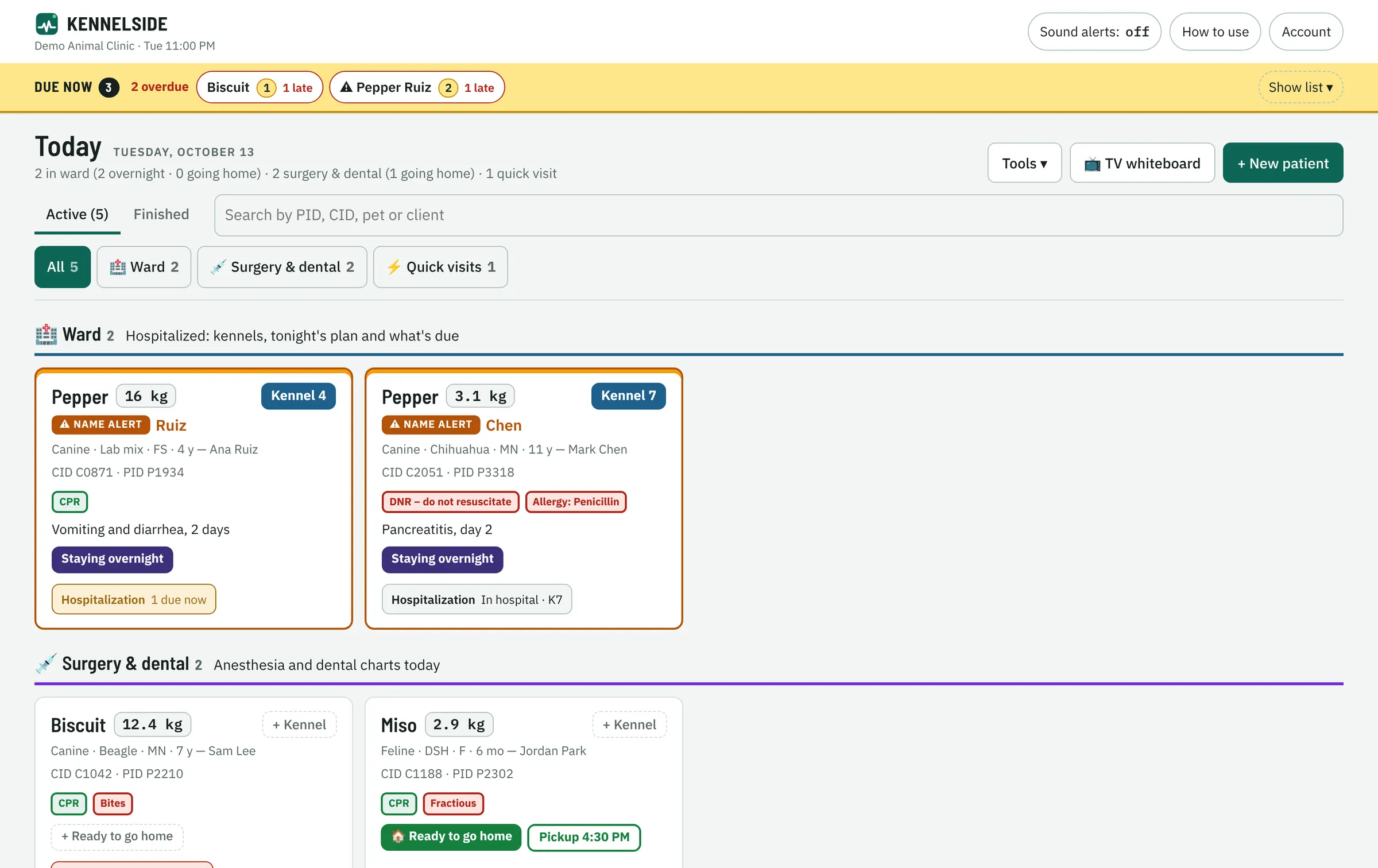
Today is the home screen, laid out like the TV: Ward, Surgery & dental and Quick visits. Tap a chip to see one section at a time.
- One + New patient button for every kind of visit
- Kennel number on every patient; tap the tag to change it
- To do today checklist on each patient (bloodwork, IV catheter, procedure, microchip, pain meds, nail trim, meds to go home). Tap an item when it's done; it shows on the TV too
- Who's staying overnight, who's going home and what's due, at a glance
- Protocols, controlled drug log and shift handover in the menu on the left
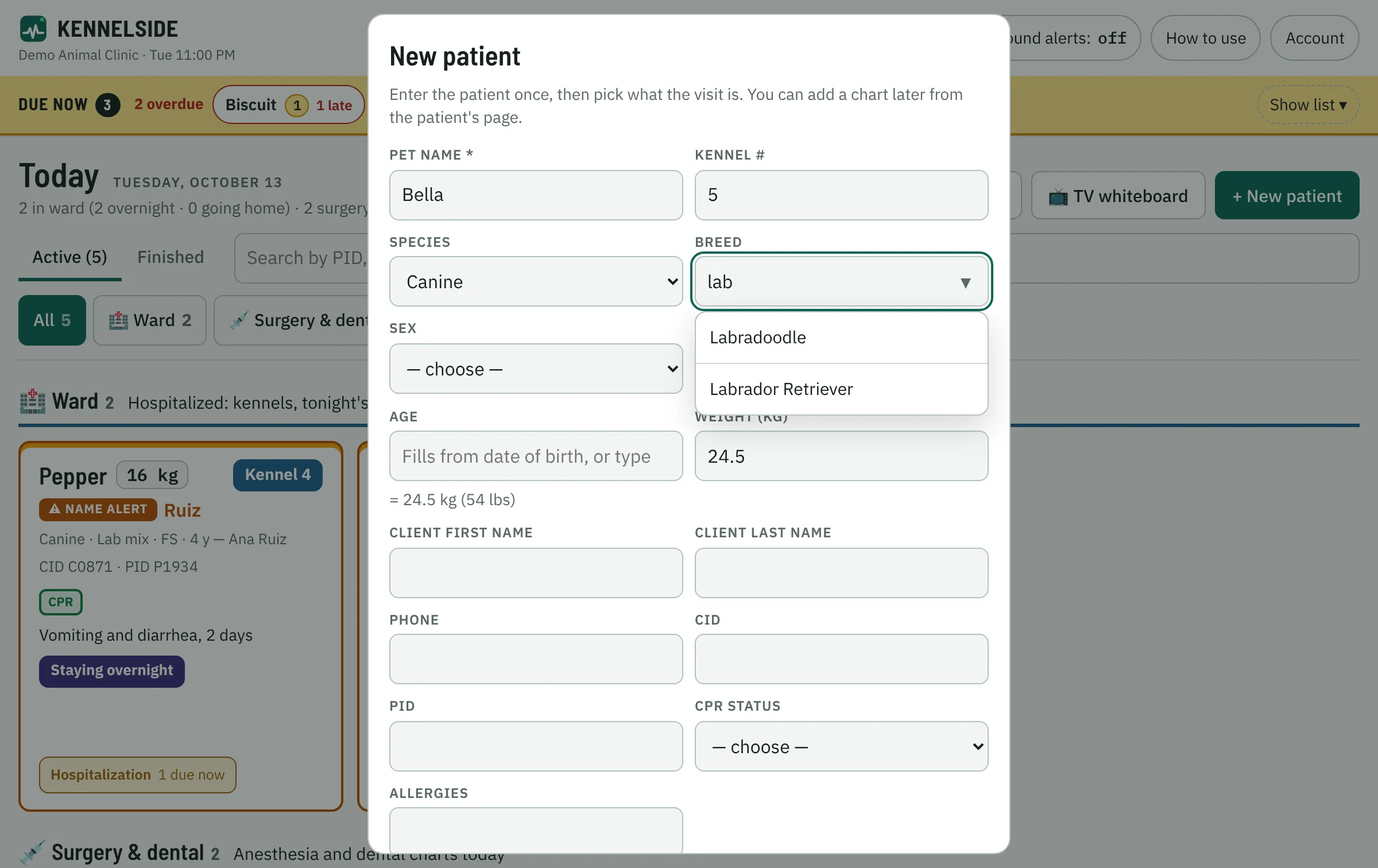
Start typing a breed and pick from 288 dog or 80 cat breeds. Sex in one tap. Choose a date of birth and the age fills in. The weight sets every dose.
The hourly chart, without the clipboard.
Rows for vitals, fluids, treatments, intake and output; one column per hour, with the date under every time. Due boxes turn yellow, late ones red.
- Treatment protocols add a set of orders in one tap
- Fluid calculator and running fluid totals
- Multi-day stays keep the same meds and schedules
- Discharge summary and owner instructions from the chart
- Copy as text: every med and treatment with times given and initials, ready to paste into your practice software notes
- Temperatures in °C or °F, set once for the whole clinic
Five-minute vitals, never missed.
Timers for anesthesia and surgery, and a countdown to the next reading that turns amber when due and red when late.
- Pre-op exam, pre-anesthetic checklist and ASA status
- Drugs by phase: pre-med, induction, maintenance, intra-op
- Logging induction doesn't start the clock; Start anesthesia does
- Recovery, then ✓ Recovered under the patient's name
- Ready to go home with a pickup time, on Today and the TV
- Emergency drug doses worked out from the weight
Chart a mouth in a minute.
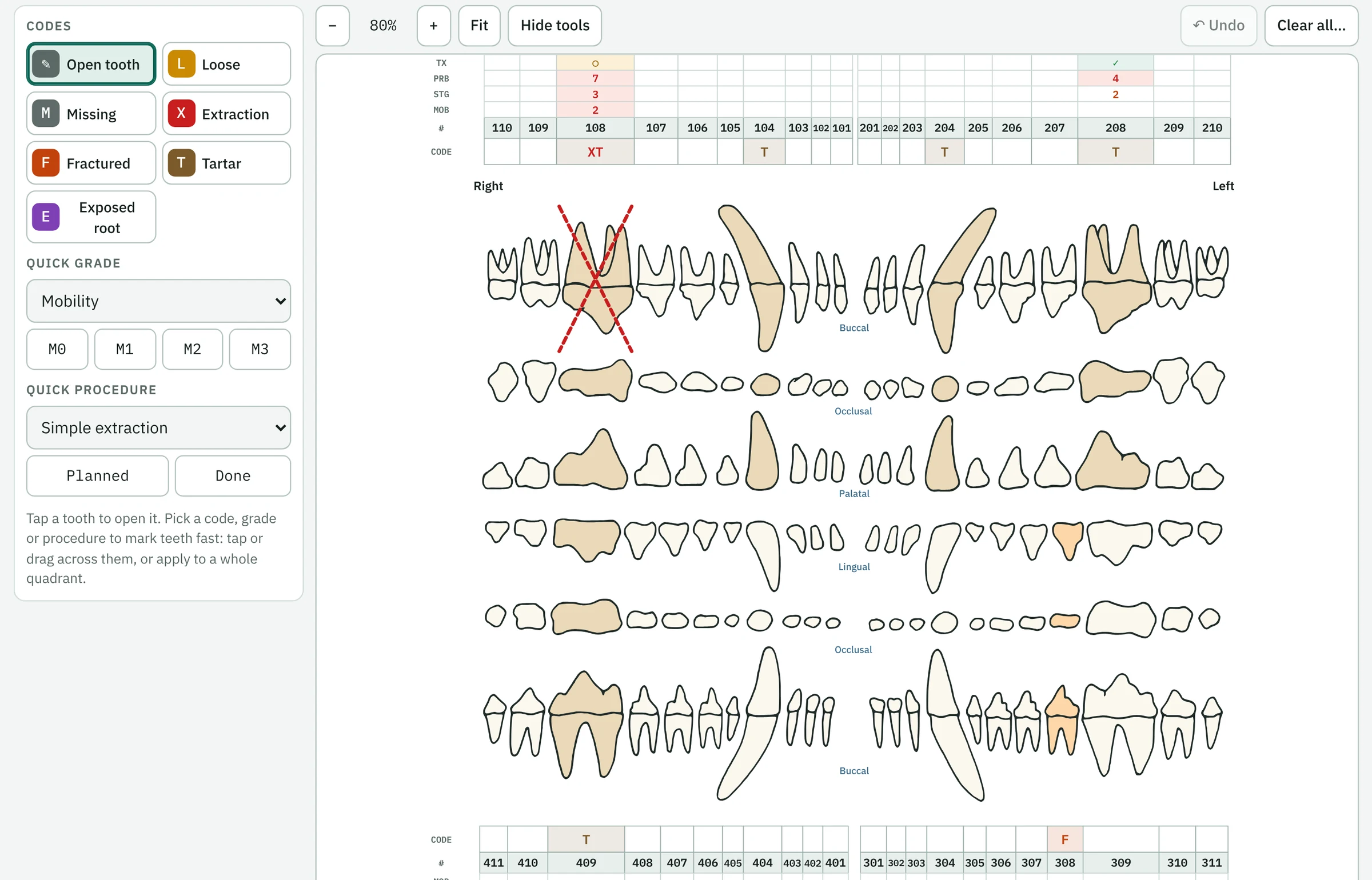
Pick a code and tap teeth, or drag across a whole quadrant. Canine and feline layouts with Triadan numbers.
- Codes, mobility, perio stage, gingival index and probing depths
- Planned and completed procedures, like extractions and restorations
- Photos and notes on any tooth
- Tools sit beside the chart so it stays big
This is the Kennelside dental chart: codes and quick grading on the left, every view of every tooth, and probing, stage and mobility rows above each tooth.
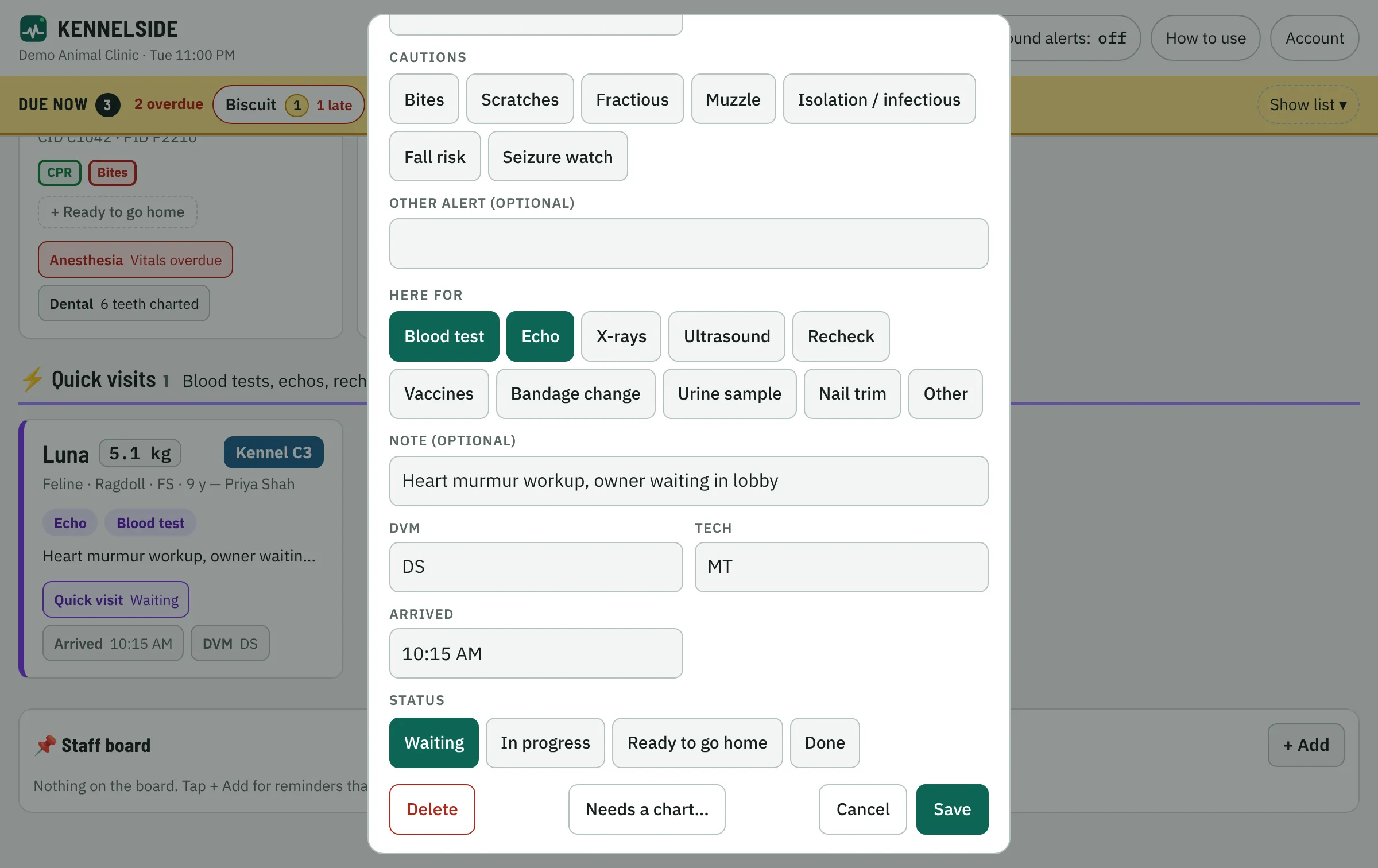
In for a blood test? No chart needed.
Blood tests, echos, rechecks and bandage changes get a quick visit instead of a full chart. They show on Today and on the TV, so the whole team knows who's in.
- Pick what they're here for and add a note
- DVM, tech and arrival time
- Waiting → In progress → Ready to go home → Done
- Needs to stay? Needs a chart… turns it into a hospital, anesthesia or dental chart, with the details carried over
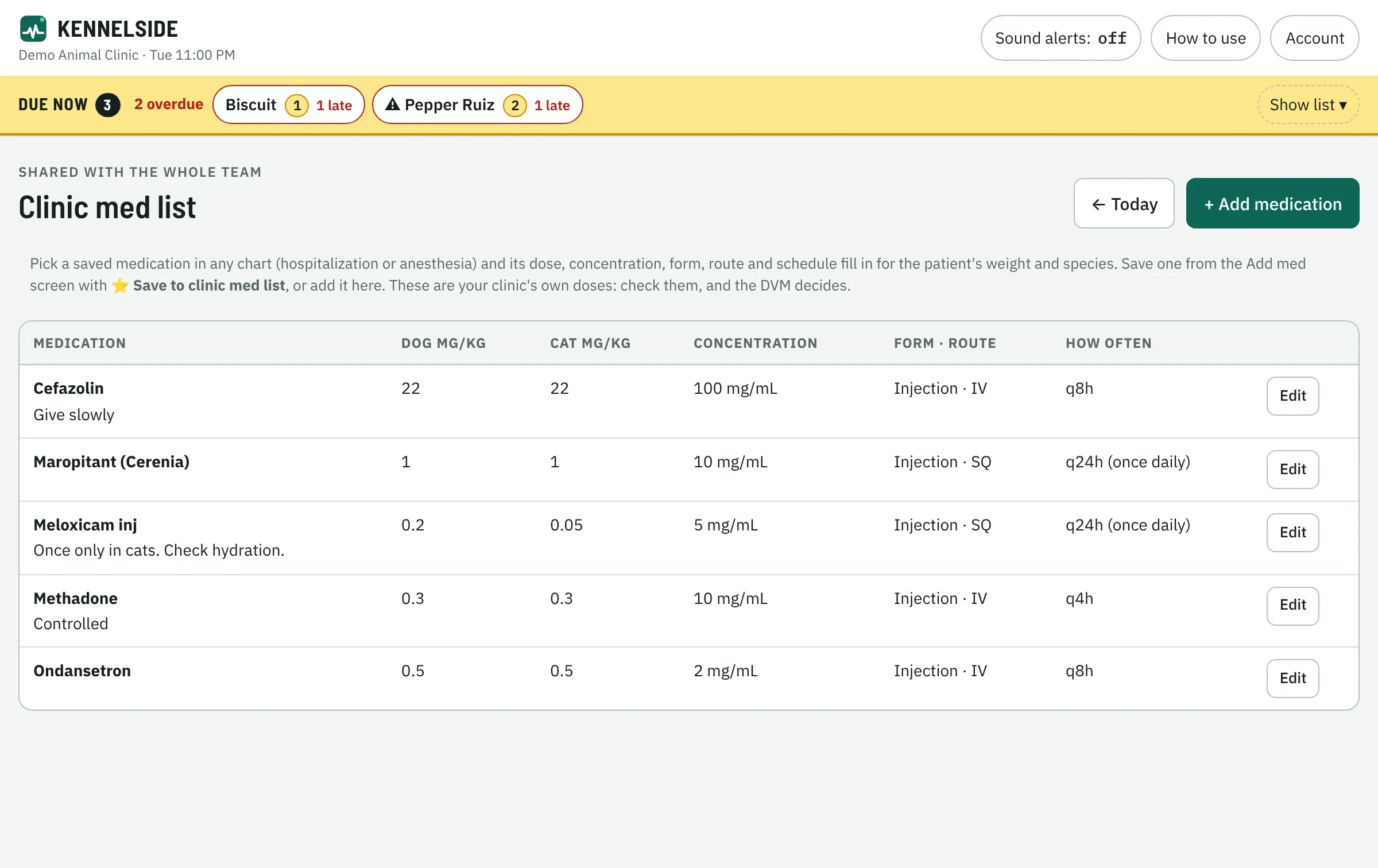
Your clinic's doses, filled in for you.
Save the meds your clinic uses most, once. Next time anyone picks one on a chart, the dose, concentration, route and schedule fill in, worked out for that patient's weight and species.
- Separate dog and cat mg/kg
- Save from any medication form with ⭐ Save to clinic med list
- Shared with the whole team, on hospitalization and anesthesia charts
- Always shown as a prompt to check: your DVM decides
The clinic med list in Kennelside, in the menu on the left. Anyone on the team can add or edit a med.
Put the whole ward on one screen.
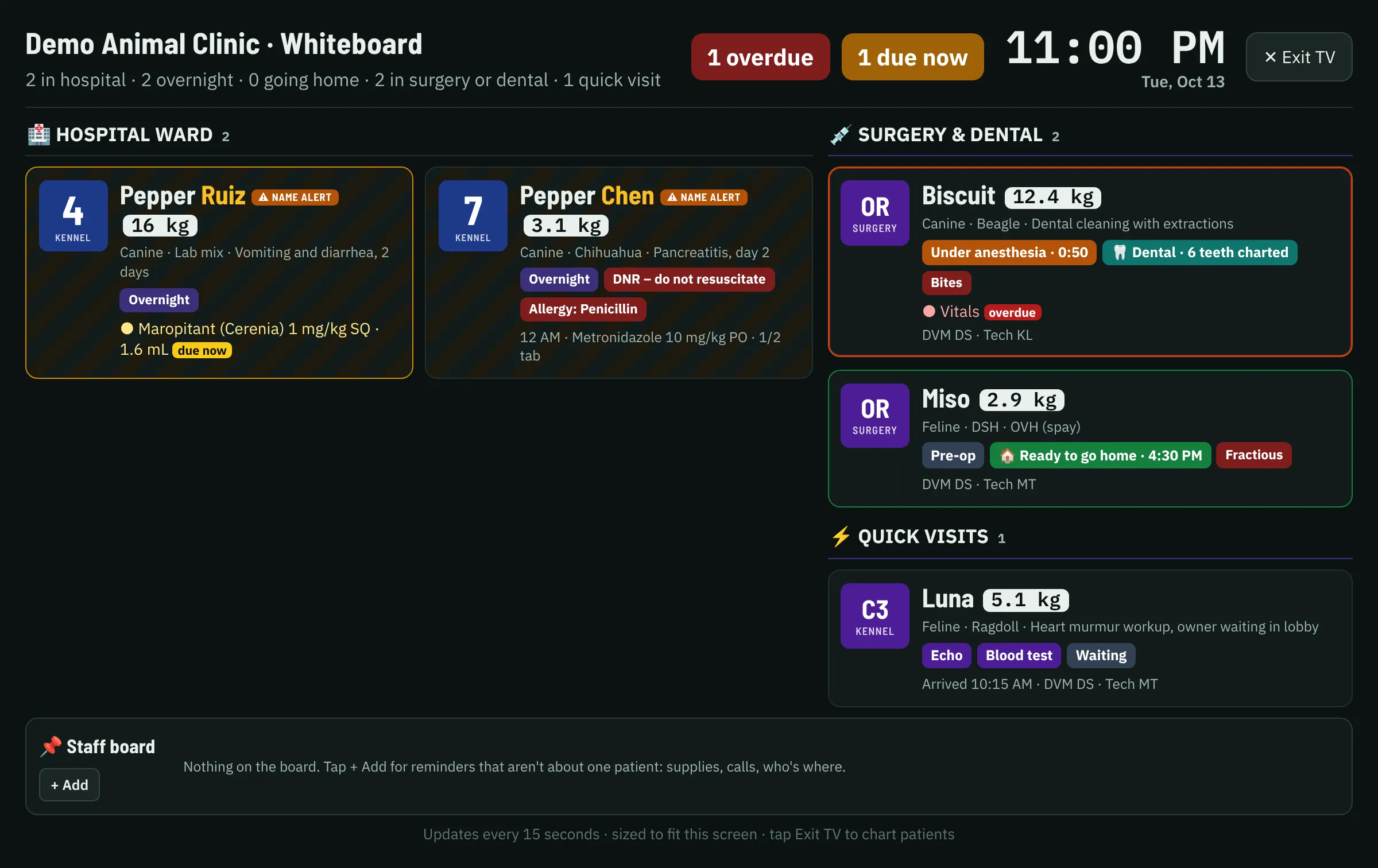
The TV splits in two: hospitalized patients on the left; surgery, dental and quick visits on the right. Pet and client last name, kennel, weight, overnight or going home, alerts, to-dos and what's due, big enough to read across the room.
- Always fits on one screen, however busy the day: cards shrink and add columns
- Rows or boxes: one patient per row, or cards side by side. Switch with one tap
- Works on a TV mounted sideways (portrait), with a Rotate button for TVs that can't turn the picture themselves
- Under anesthesia, in recovery, ✓ Recovered and ready to go home on every surgery card
- Works on any smart TV browser or a small computer behind the TV
- Staff board for notes like supplies, calls and who's in surgery
- Due-now bar with one chip per patient, even on a busy day
Kennelside on a treatment-room TV: the ward on the left, surgery & dental and quick visits on the right, and the staff board along the bottom.
A second look before every dose.
When a dose in mg/kg is far outside the usual range for that drug and species, Kennelside asks you to check before saving. Ranges are prompts; your veterinarian decides.
- About 50 common drugs, dog and cat ranges
- Name alert when two patients in clinic share a name
- DNR, allergies and cautions on every screen
Wi-Fi drops. Charting doesn't.
Entries are saved on the tablet in order and sent as soon as the connection is back. An orange bar tells everyone what's waiting.
Clean records for your practice software.
Small PDFs
A 24-hour chart is about 11 KB and a dental chart about 240 KB, so attachments stay light.
Shift handover
Each patient on one page: last vitals, fluids running, what's due next and the latest notes.
Controlled drug log
Every controlled dose with volume, waste and witness, exported as a CSV spreadsheet.
Every change, with a name on it.
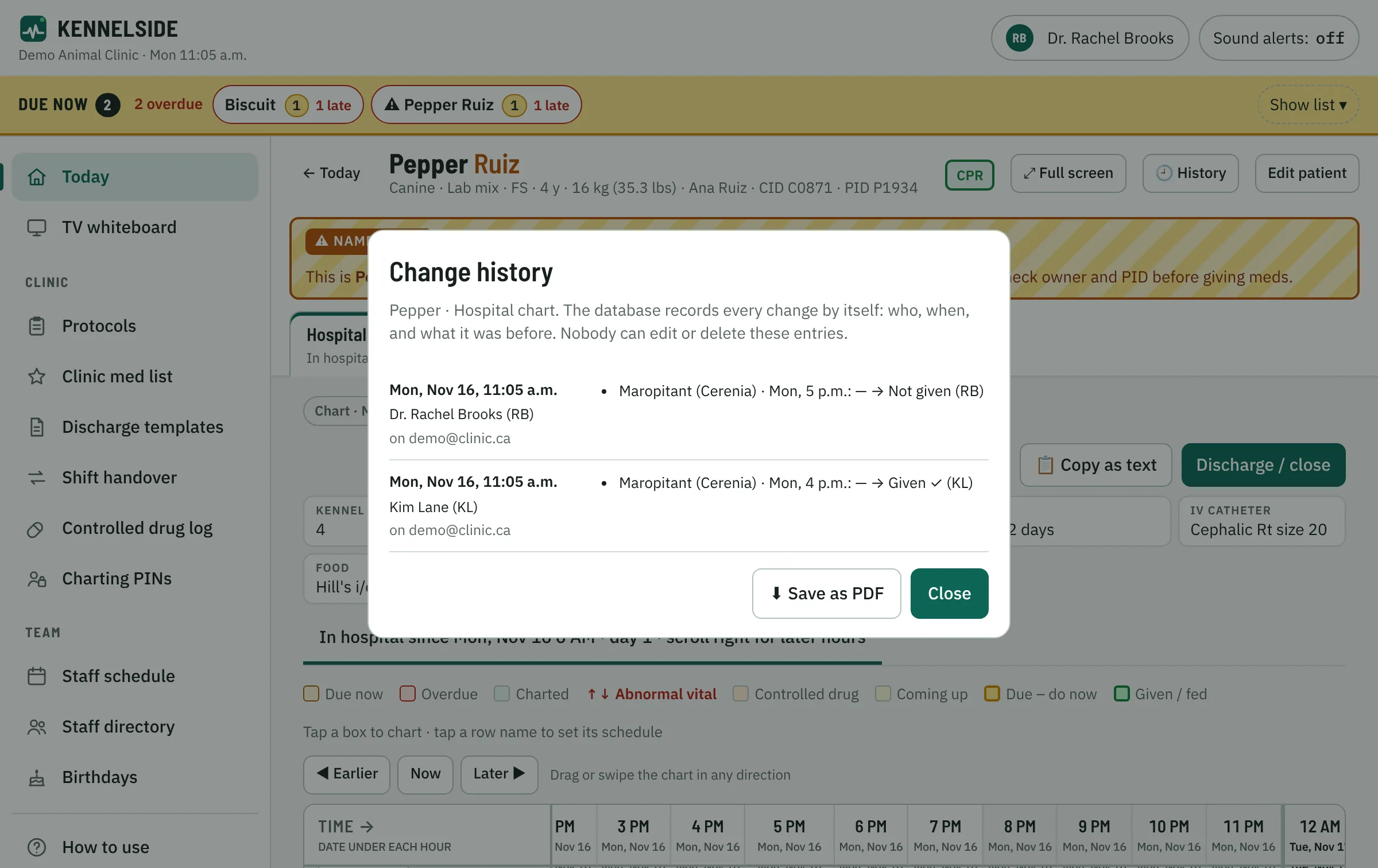
Tap 🕘 History on any patient to see each change to their hospitalization, anesthesia or dental chart, newest first: when, who, and what it was before.
- Recorded by the database on every save, so no screen or older app version can skip it
- Nobody can edit or delete the entries, and a deleted chart's full copy is kept
- Save the history as a PDF for a records request or a case review
One tablet login, everyone's own name.
Many clinics sign the ward tablets in once. Switch on Charting PINs and each person taps their name and types their own PIN before charting.
- The history shows the person, not just the shared login
- Their initials go on everything they chart, with no question per patient
- Lock hands the tablet over, and it locks itself when nobody has used it for a while
- Optional, included, switched on by a clinic admin
A patient's change history in Kennelside: two people charting on one shared tablet login.
Paperwork owners fill in themselves.
New clients fill in their details on the clinic tablet or from a link on their phone. Before treatment, they sign the treatment authorization and choose CPR or DNR, and the patient's chart shows it.
On the tablet or their phone
Hand over the clinic tablet, or email the owner a private link. The link works once, for 7 days.
Treatment authorization and CPR or DNR
Sent for a patient and signed with a finger. ✓ Auth signed and CPR or DNR show on the patient, on Today and on the TV whiteboard.
Signed PDFs for your records
Save each signed form as a PDF, in the same layout as your paper forms, ready to attach in your practice software. Add the patient to Kennelside straight from a new client form.
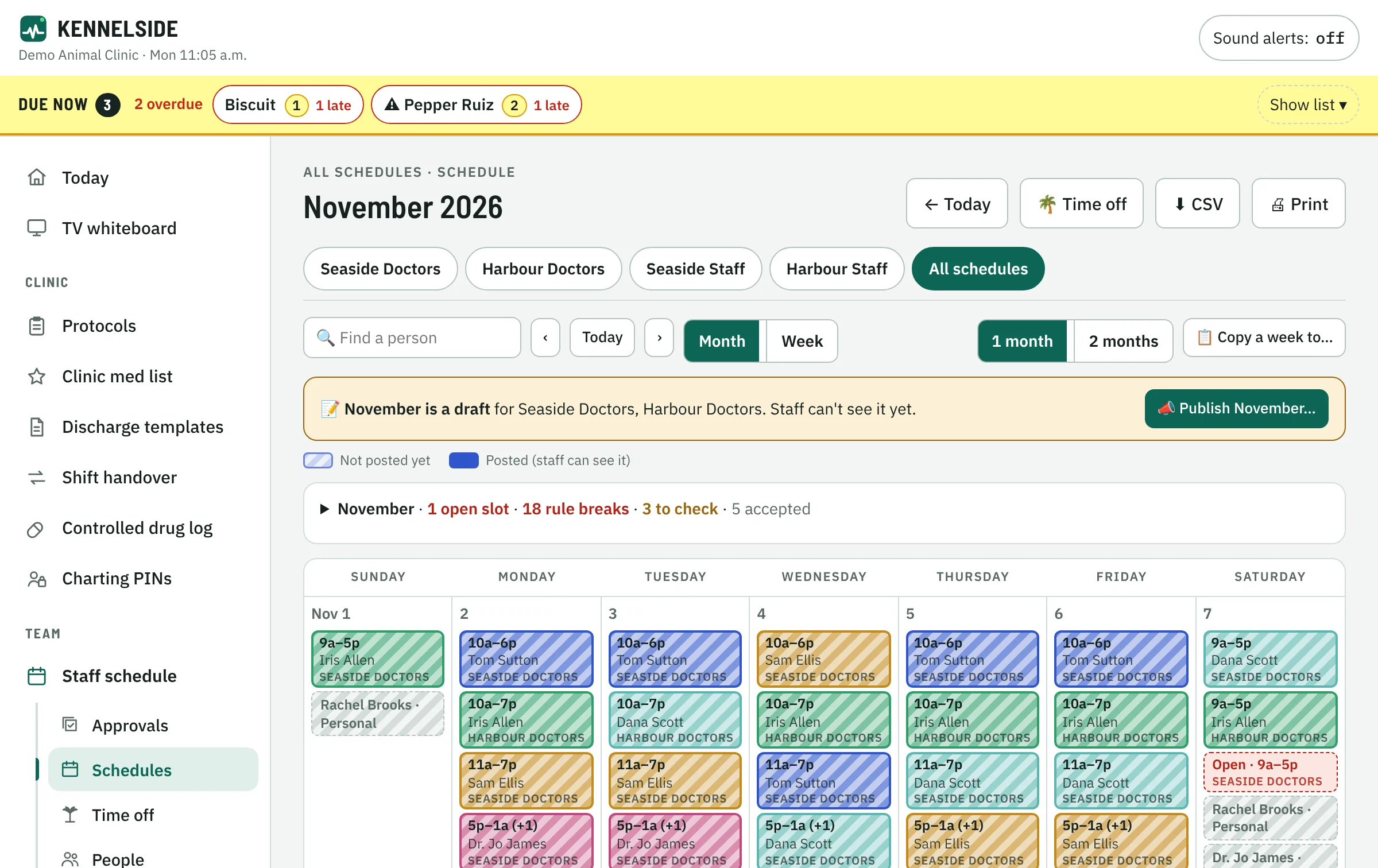
The schedule, in the same app as the ward.
Build the month as a draft, publish it when it's ready, and Kennelside emails everyone their own shifts. Later changes go only to the people affected.
- Shift templates, repeat weekly, copy a week, stat holidays and rule checks
- Time off and open-shift requests in one place, with your clinic's notice rules
- Shift reminders by email, the day before or hours before
- Staff sign in to see only their schedule, on any phone
- Who's on duty now on Today and the TV, plus a staff directory and birthdays
- Two clinics? Share staff, and they see all their shifts in one calendar
- Team check finds the same person entered twice, or with different emails or roles at two clinics, and merges them with their shifts
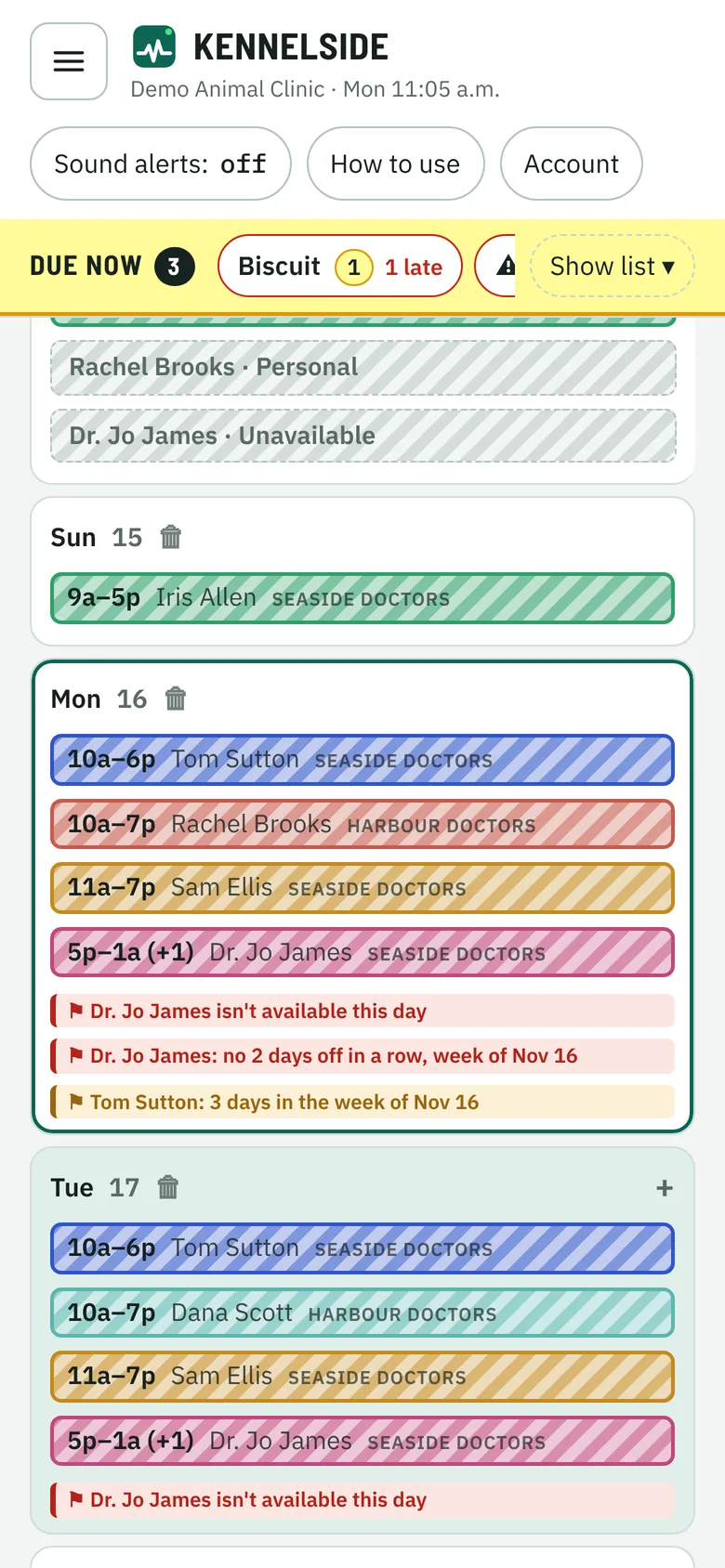
The month in Kennelside: drafts striped, published shifts solid, each person in their own colour.
Clock in with a PIN. Timesheets that follow B.C.'s rules.
Staff clock in and out on the clinic tablet with their own PIN, and the time comes from the server, not the tablet's clock. Managers get two-week timesheets ready for the accountant.
Their own PIN, server time
Each person taps their name and types their PIN. Changing the tablet's clock changes nothing: every punch is stamped by the server in B.C. time.
Overtime and stat pay worked out
Daily overtime after 8 and 12 hours, weekly after 40, stat holidays for those who qualify, and flags for short rests and missed clock-outs, under B.C.'s Employment Standards Act.
Managers fix and approve
Add missed time, fix a punch with a reason, approve the pay period and export it as a spreadsheet or PDF. Every change keeps a history, behind the manager PIN.
Rescue society billing, done by the 5th.
For clinics that bill SPCA branches and rescues each month. Add each society's account statement PDF from your practice software, and Kennelside files it by society and month, checks it adds up and makes the paperwork.
Checked before it's filed
Invoices add up to the statement, item lines add up and the balance matches. A month that doesn't add up isn't filed, and Kennelside says why.
Statement and invoices in one PDF
Print the monthly statement with every invoice, under your clinic's own name, address and logo. Owners who pay part at the counter are shown on each invoice.
Nothing slips
Each month goes Draft, Approved, Sent. See what's still due by the 5th, balances over 60 and 90 days, and flags to decide, each with a next step. Email it to the society from Kennelside.
Opens only with your clinic's manager PIN. Reads AviMark's Client Account Register and account statements from other practice software. Society accounts is switched on for your clinic on request: ask us.
One price. Everything on this page.
Kennelside Complete: $249.99 CAD a month per clinic, plus applicable taxes. Every feature above is included, for your whole team and every device. 7 days free.
Start with your own patients.
7 days free, then $249.99 CAD a month with everything included. Cancel any time.